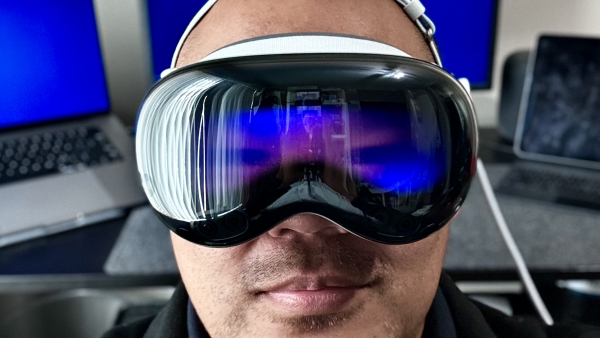
It's been just over two years of owning the Apple Vision Pro. After spending three months in Tokyo and one month in Manila with it as a digital nomad, I have a much better sense of how AVP fits into my life. Here are my thoughts:
- The "Lie Flat" Device — Back in 2011, Steve Jobs argued that the PC is a "lean forward" device — meant for sitting at a desk, looking at a monitor, and actively working. In contrast, he pitched iPad 1.0 as a "lean back" device, primarily for consumption.1 If we stick to that analogy, AVP is a "lie flat" device. I've spent hours lying in bed and on the couch watching movies on a theater-sized screen floating above me, and I've grown quite fond of casually browsing Reddit and AirPlaying my iPhone while binging TV shows.
- …Except when sick — When I'm dealing with congestion or a headache, the very last thing I want to do is strap a giant headset to my face.
- Amazing in small spaces — AVP's ability to dial up immersion makes small hotel rooms and economy seats feel like wide-open spaces. There were so many times I took off the headset and thought, "Whoa, I forgot I was in this tiny room."
- Gray area for airlines — Airlines are cracking down on power banks due to fire risks, and AVP's external battery now sits in an awkward gray area. To a flight attendant, it can look suspiciously like a power bank. To a techie, it's the device's primary power source — no different conceptually from a laptop's internal battery. In practice, whether I get to use it mid-flight comes down to who's working the cabin that day.
- The New Dual Knit Strap — A big improvement in comfort over the original Solo Knit and Dual Loop straps.
- Typing Still Sucks — Unless I have a Bluetooth keyboard connected (which I never do), I've given up on any meaningful typing. Passwords and quick searches only. Hopefully Apple adds something like Apple TV's Remote Keyboard feature.2
- My Workaround: Hyperduck — Instead of pecking at the virtual keyboard, I use Hyperduck to send links to my Mac, where I can actually be productive.
- Multitasking is Not Great — Native Vision apps are intentionally designed with big buttons and extra padding to improve Gaze & Pinch accuracy. The downside: apps take up a lot of visual space, and having multiple windows side-by-side means turning my head way more than I'd like. I've settled on Mac Virtual Display or a max of two windows at a time. Hopefully Apple adds something like macOS' Mission Control down the road.3
- Mac Virtual Display: Ultrawide on Demand — Here's what I've realized working remotely: I don't like wearing AVP for an entire workday — but that's okay, because about 85% of my work is fine on my 16" MacBook Pro screen. The remaining 15% — when I need serious screen real estate for designs, documentation, VS Code, Terminal, Claude, and Chrome all at once — Mac Virtual Display absolutely shines.
- Can't stream DRM'd content via Mac Virtual Display — Due to DRM and HDCP standards, streaming video to your Mac while using Mac Virtual Display results in a blacked-out screen. Frustrating, because I love having a shitty horror movie running in the background while I work.
- No True iPhone Mirroring — AirPlaying the iPhone screen to AVP is possible, but true iPhone Mirroring — with actual control of the phone, like on macOS — isn't. This feels like an obvious feature Apple will add eventually.
- AirPlay, iPhone Mirroring, or Mac Virtual Display — I hate having to pick just one. Ideally I'd mirror both my Mac and iPhone to AVP simultaneously and stay fully immersed. But because all three share the same underlying wireless pipeline, only one can stream at a time. (And I refuse to pay $300 for the Developer Strap to work around it.)
- Official YouTube App — HUGE. Once they add downloadable videos for YouTube Premium subscribers, AVP becomes the ultimate travel entertainment device.
- NBA Courtside POV — GAME-CHANGER. My Lakers were the first team to broadcast games as immersive video, and it's unlike anything else. Courtside seats for a regular-season Lakers game start around $2,500 — I'd argue that watching just two marquee games in immersive video alone justifies the cost of AVP.
- Spatial Photos & Videos — This one hits different. Before my dog passed away, I managed to capture a handful of spatial videos. Now, whenever I feel like my memories of him are starting to fade, I rewatch those videos and I'm instantly transported back to that exact moment. Nothing else does that. Nothing.
When I originally bought my AVP, a big part of my Boy Math4 was a 50/50 split between work and entertainment. Even with the much-improved Dual Knit strap, the weight still makes wearing it for an entire workday uncomfortable. My usage has settled at about 10% work — and honestly, I'm cool with that, for now.
I can get by without an external monitor for my MacBook Pro…but I still prefer one. I can get by without my iPad Pro streaming background video while I work…but I still prefer having it. My plan now is to hold onto my LG Ultrafine 5K and iPad Pro as long as possible, and bet that Apple Vision Pro 2 or 3 gets more comfortable by the time I'm ready to retire them.
As for the remaining 90%? As a bachelor with plenty of uninterrupted downtime, I fucking love my Apple Vision Pro. When I need an evening to rest and recharge, nothing beats lying flat in bed, fully immersed in an IMAX movie floating above me.
Two years in, Apple Vision Pro still feels like a device that's figuring itself out — and honestly, so am I. The hardware will get lighter. The software will get smarter. Features I've been waiting for (iPhone Mirroring, downloadable YouTube, better multitasking) feel less like wishful thinking and more like inevitabilities.
Check back with me in another year or two.
-
iPad — As time went by, the iPad has evolved into a mobile production/creation device of sorts. ↩
-
Remote Keyboard — On Apple TV, whenever you navigate to a search bar, login field, or any text entry box, a push notification automatically appears on your nearby iOS devices, allowing you to enter text using your iOS device's keyboard. ↩
-
Mission Control — On macOS, Mission Control gives you a "bird's-eye view" of your entire workspace. It's a built-in macOS feature designed to help you manage the chaos of multiple open windows, full-screen apps, and virtual desktops. ↩
-
Boy Math — A viral social media trend and meme format that highlights the illogical or self-serving rationalizations men sometimes use to justify their behavior, finances, or perception of time. ↩